

输入 Entry
Entry 是一个用于输入单行文本或任何单行信息的控件。
演示示例
python
from tkinter import *
from tkinter.ttk import *

import PIL.Image, PIL.ImageTk


def main():
    root = Tk()

    frame = Frame(root)
    frame.grid(row=4, column=4)

    # 图片
    pil_xilian = PIL.Image.open("./resources/135749246_p0.png").resize((360, 360))
    xilian = PIL.ImageTk.PhotoImage(pil_xilian)

    Label(frame, image=xilian).grid(row=0, column=0, columnspan=4)

    Label(frame, text="用户名").grid(row=1, column=0)
    Entry(frame, width=30).grid(row=1, column=1, columnspan=2)
    Button(frame, text="X", width=2).grid(row=1, column=3)

    Label(frame, text="密码").grid(row=2, column=0)
    Entry(frame, show="*", width=30).grid(row=2, column=1, columnspan=2)
    Button(frame, text="X", width=2).grid(row=2, column=3)

    Button(frame, text="登录", width=12).grid(row=3, column=1)
    Button(frame, text="注册", width=12).grid(row=3, column=2)

    root.mainloop()


if __name__ == '__main__':
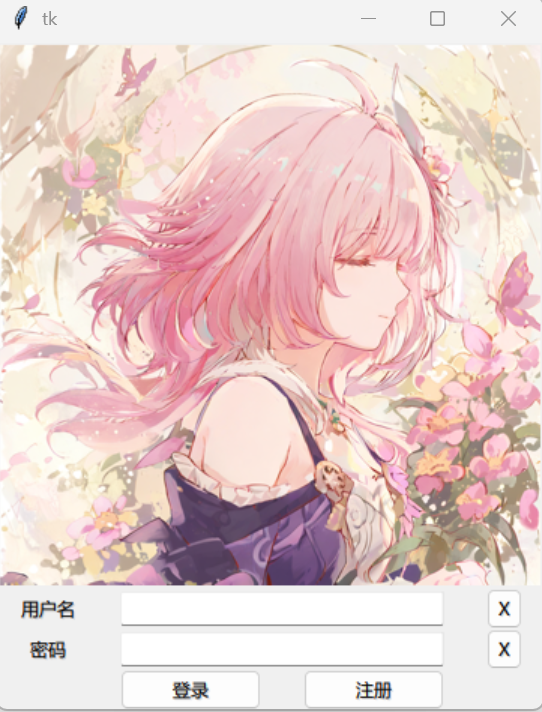
main()为了调节显示效果,这里使用 width 参数指定了 Button 和 Entry 控件的宽度。无法通过传参来指定控件高度。
显示效果如下:
获取 Entry 内容
要获取 Entry 的内容,需要使用 Entry 对象的 get 方法。为此,你需要稍微改写上面的代码。
如下的代码实现了登录按钮的登录功能,在登录时打印给出的用户名和密码。
python
from tkinter import *
from tkinter.ttk import *

import PIL.Image, PIL.ImageTk


def login(username: str, password: str):
    print(f"login with ({username=}, {password=})")


def main():
    root = Tk()

    frame = Frame(root)
    frame.grid(row=4, column=4)

    # 图片
    pil_xilian = PIL.Image.open("./resources/135749246_p0.png").resize((360, 360))
    xilian = PIL.ImageTk.PhotoImage(pil_xilian)

    Label(frame, image=xilian).grid(row=0, column=0, columnspan=4)

    Label(frame, text="用户名").grid(row=1, column=0)
    Entry(frame, width=30).grid(row=1, column=1, columnspan=2)
    entry_username = Entry(frame, width=30)
    entry_username.grid(row=1, column=1, columnspan=2)
    Button(frame, text="X", width=2).grid(row=1, column=3)

    Label(frame, text="密码").grid(row=2, column=0)
    Entry(frame, show="*", width=30).grid(row=2, column=1, columnspan=2)
    entry_password = Entry(frame, show="*", width=30)
    entry_password.grid(row=2, column=1, columnspan=2)
    Button(frame, text="X", width=2).grid(row=2, column=3)

    Button(frame,
           text="登录",
           width=12,
           command=lambda: login(entry_username.get(), entry_password.get())
           ).grid(row=3, column=1)
    Button(frame, text="注册", width=12).grid(row=3, column=2)

    root.mainloop()


if __name__ == '__main__':
main()这样,在点击登录按钮时,控制台将打印在 login() 方法中指定的文本。
text
login with (username='114514', password='123456') MangoFanFan_